

January 20, 2026
|
5 min read

The debate between Databricks and AWS SageMaker is often framed as "Open Source vs. Cloud Native," but in 2026, it is really a battle of architectures. Databricks wants to be your "Data Intelligence Platform," where AI is just a layer sitting on top of your massive data lake. Conversely, SageMaker wants to be your "ML Workshop," a modular set of tools purely built for model building.
Choosing the wrong one dictates your entire engineering culture and, more importantly, impacts your monthly bill. This guide looks beyond the marketing jargon to compare their architectures, pricing models (DBUs vs. Instance Hours), and explains why a growing number of enterprises are opting for a "Compute Neutral" third path with TrueFoundry.
This section explains how Databricks and SageMaker fundamentally differ in architecture and workflow design.
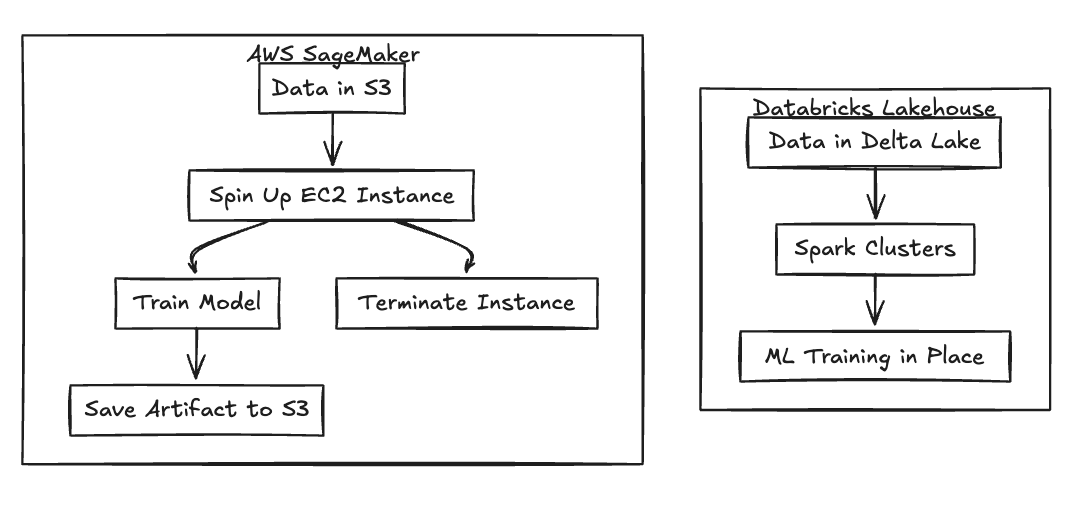
Databricks takes a data-first philosophy, built heavily around the DNA of Apache Spark. The platform is designed for large-scale distributed data processing, where machine learning runs directly where the data lives—inside the Delta Lake storage layers. This architecture is particularly well-suited for teams running heavy data engineering pipelines that feed directly into downstream ML workloads, effectively bringing the compute to the data rather than moving data to the compute.
SageMaker flips the script with a model-first approach. It functions as a collection of managed tools specifically designed for training and deployment. In this model, compute instances are spun up temporarily to perform a specific task, often pulling data from S3 or external systems before shutting down. This fits pure MLOps workflows where data engineering happens outside the platform, treating the model building process as a distinct, ephemeral compute event.
Fig 1: Architectural Flow Differences
Both platforms excel in different areas depending on the use case. This section compares strengths across common ML workflows that teams care about most.
Databricks offers a highly collaborative notebook environment that feels surprisingly similar to shared Google Docs. Multiple data scientists can edit code in real-time, making it the preferred choice for teams that value simultaneous collaboration. In contrast, SageMaker Studio often feels slower due to the time required for environment spin-up and session initialization. Consequently, data science teams generally prefer the fluid, notebook-centric workflow that Databricks provides.
When it comes to production, SageMaker shines. It enables one-click deployment to managed endpoints that come with built-in auto-scaling right out of the box. While Databricks has introduced Mosaic AI Serving, it often feels like an add-on rather than a core platform capability. Smaller workloads, in particular, may experience cold-start latency on Databricks serving clusters, whereas SageMaker endpoints are optimized for reliable, always-on inference.
The two platforms have taken different paths for Generative AI. Databricks focuses heavily on Mosaic AI, emphasizing the training and fine-tuning of custom foundation models—ideal for teams that want to own their IP. SageMaker, on the other hand, emphasizes integration with AWS Bedrock, prioritizing easy API access to pre-trained models. The choice essentially reflects whether your team wants to build and own models (Databricks) or consume managed ones (SageMaker).
Both platforms use complex pricing models that hide real costs at scale. This section breaks down how each platform charges and where surprises appear.
Databricks utilizes a pricing model that many teams describe as a "double tax." You are charged Databricks Units (DBUs) for the platform's management layer, but you must also pay AWS directly for the underlying EC2 instances running that compute. This means you are paying two vendors simultaneously for the same hour of work. Furthermore, idle interactive clusters can continue burning DBUs even when no active work is occurring, leading to significant waste if not monitored closely.
SageMaker avoids the double bill but applies a significant markup over raw EC2 pricing for its managed services. While training jobs stop billing the moment they complete, inference endpoints run continuously, 24/7. If auto-scaling is misconfigured, these endpoints lead to persistent, high costs even during periods of low traffic, as you are paying a premium rate for every hour the instance is active.
Both platforms introduce forms of vendor lock-in that become painful over time. This section explains why leaving either platform is difficult.
To achieve optimal performance on Databricks, you are effectively required to convert your data into Delta Lake table formats. While Delta is technically open-source, the highly optimized query engines (like Photon) that make it fast are proprietary to Databricks. Migrating away often results in immediate performance degradation and requires extensive workflow rewrites to regain speed on a different platform.
SageMaker encourages the use of proprietary container structures and inference pipeline abstractions. Moving these endpoints to a standard Kubernetes cluster often requires rewriting Dockerfiles and serving logic from scratch. Additionally, the tight integration with AWS specific tools—like IAM roles and VPC configurations—increases dependency, making it difficult to move workloads to a multi-cloud environment later.
As ML systems mature, teams reassess whether either platform aligns with long-term goals.
Platform costs tend to grow faster than expected as usage scales across different teams and environments. Additionally, operational complexity increases due to fragmented tooling; teams often find themselves using Databricks for data and SageMaker for training, resulting in split workflow ownership. Ultimately, advanced engineering teams want flexibility without committing fully to one vendor ecosystem, seeking a way to decouple their compute from the platform layer.
TrueFoundry offers Databricks-like usability with raw infrastructure pricing. This section explains how it bridges the gap between data platforms and managed ML services.
TrueFoundry provides the notebooks and job workflows that data scientists are familiar with, but without the infrastructure wait times. Jupyter notebooks launch instantly on any CPU or GPU without the long startup delays typical of other platforms. This allows teams to avoid the friction of SageMaker Studio environment initialization and get straight to coding.
Unlike the markup models of its competitors, TrueFoundry runs directly inside your existing AWS or GCP account. You pay raw EC2 or GCE prices without any DBU taxes or managed service markups. By utilizing your own cloud credits and infrastructure directly, teams typically reduce their compute costs by up to 40%.
TrueFoundry connects to your data wherever it lives, whether that is S3, Snowflake, or Databricks. There is no forced data movement into proprietary storage formats to get performance. This ensures that teams retain full control over their data architecture decisions, rather than building around a vendor's storage requirements.
A side-by-side view helps decision-makers understand trade-offs clearly.
Table 1: Platform Comparison Matrix
There is no universal winner. This section summarizes which platform fits which type of organization.
The future of AI infrastructure is modular. You shouldn't be forced to pay a "management tax" on every hour of GPU usage just to access good tooling. TrueFoundry decouples the developer experience from the underlying compute, giving you the best of both worlds.
The main difference is their focus: Databricks is a "Data Intelligence Platform" built around the Lakehouse architecture (Apache Spark), making it ideal for data-heavy workloads. SageMaker is a "Managed ML Service" focused purely on model building, training, and deployment tools on AWS.
"Better" depends on the use case. Databricks is generally better for collaborative data science and heavy data engineering/ETL. AWS (SageMaker) is generally better for production model serving and organizations strictly tied to the AWS ecosystem.
TrueFoundry is better for cost-conscious teams who want flexibility. Unlike Databricks (which charges DBUs) and SageMaker (which adds a compute markup), TrueFoundry allows you to pay raw infrastructure costs, supports multi-cloud setups, and prevents vendor lock-in by running on standard Kubernetes.
Blazingly fast way to build, track and deploy your models!
TrueFoundry AI Gateway delivers ~3–4 ms latency, handles 350+ RPS on 1 vCPU, scales horizontally with ease, and is production-ready, while LiteLLM suffers from high latency, struggles beyond moderate RPS, lacks built-in scaling, and is best for light or prototype workloads.



The latest news, articles, and resources sent to your inbox
© 2025 All rights reserved.