

Authentication Architecture Overview
The Gateway provides a four-layer authentication and authorization system:| Layer | Description |
|---|---|
| Gateway Authentication | Users authenticate to the Gateway using TrueFoundry tokens, Virtual Accounts, or your IdP tokens |
| Access Control | Role-based policies determine which users can access which MCP servers |
| MCP Server Authentication | How the Gateway authenticates to downstream MCP servers (per-user, shared, or passthrough) |
| Custom Headers | Pass additional headers to MCP servers for specialized use cases |
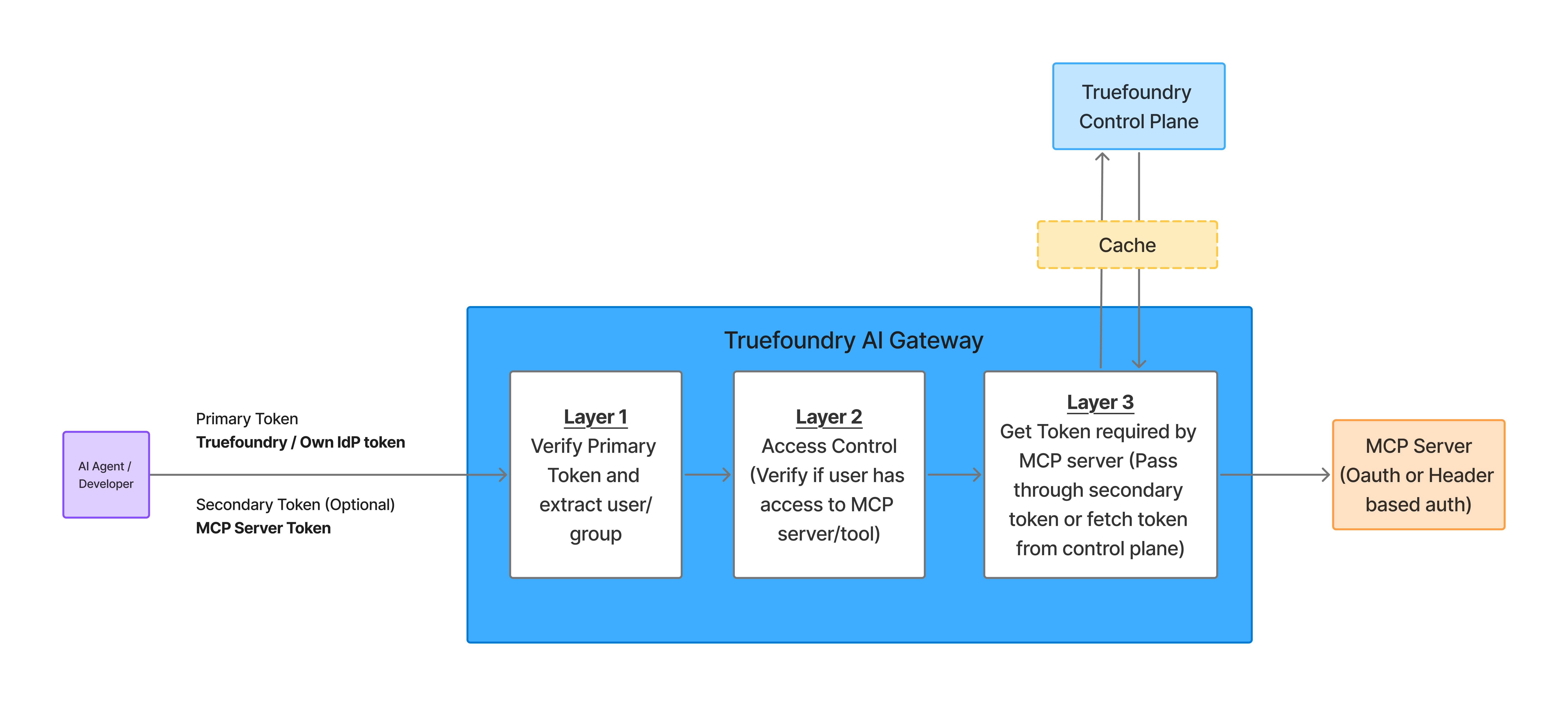
MCP Gateway Authentication and Authorization Flow
Layer 1: Gateway Authentication
Any user or application requires a token to talk to the Gateway. This allows the Gateway to identify the caller and apply authorization rules. TrueFoundry supports three authentication methods:TrueFoundry API Key (Personal Access Token)
TrueFoundry API Key (Personal Access Token)
Generate a Personal Access Token
- Navigate to Settings > API Keys in the TrueFoundry UI
- Click Generate New API Key
- Store the token securely
Use the token in requests
Virtual Account Token
Virtual Account Token
Create a Virtual Account
- Navigate to Settings > Virtual Accounts in the TrueFoundry UI
- Click Create Virtual Account
- Give it a descriptive name (e.g.,
my-agent-mcp-access) - Add permissions for the MCP servers your application needs to access
Generate and use the token
Your IdP Token (External Identity)
Your IdP Token (External Identity)
- B2B SaaS applications where your customers don’t have TrueFoundry accounts
- Applications that want to use their existing identity infrastructure
- Customer Identity and Access Management (CIAM) scenarios
Configure SSO Integration
- Navigate to Settings > SSO
- Create a new SSO configuration pointing to your IdP
- Important: Set login enabled to
false(this SSO is only for external identity, not platform login) - Note the SSO FQN for the next step
Create External Identity
- Navigate to Access > External Identities
- Click Add External Identity
- Select the SSO FQN from step 1
- Optionally add claims to match specific users/tenants
Grant MCP server access
- Navigate to the MCP server’s settings
- Go to Collaborators
- Add the External Identity with appropriate permissions
Use your IdP token in requests
Layer 2: Access Control at the Gateway
You can define which users have access to which MCP servers at the Gateway layer.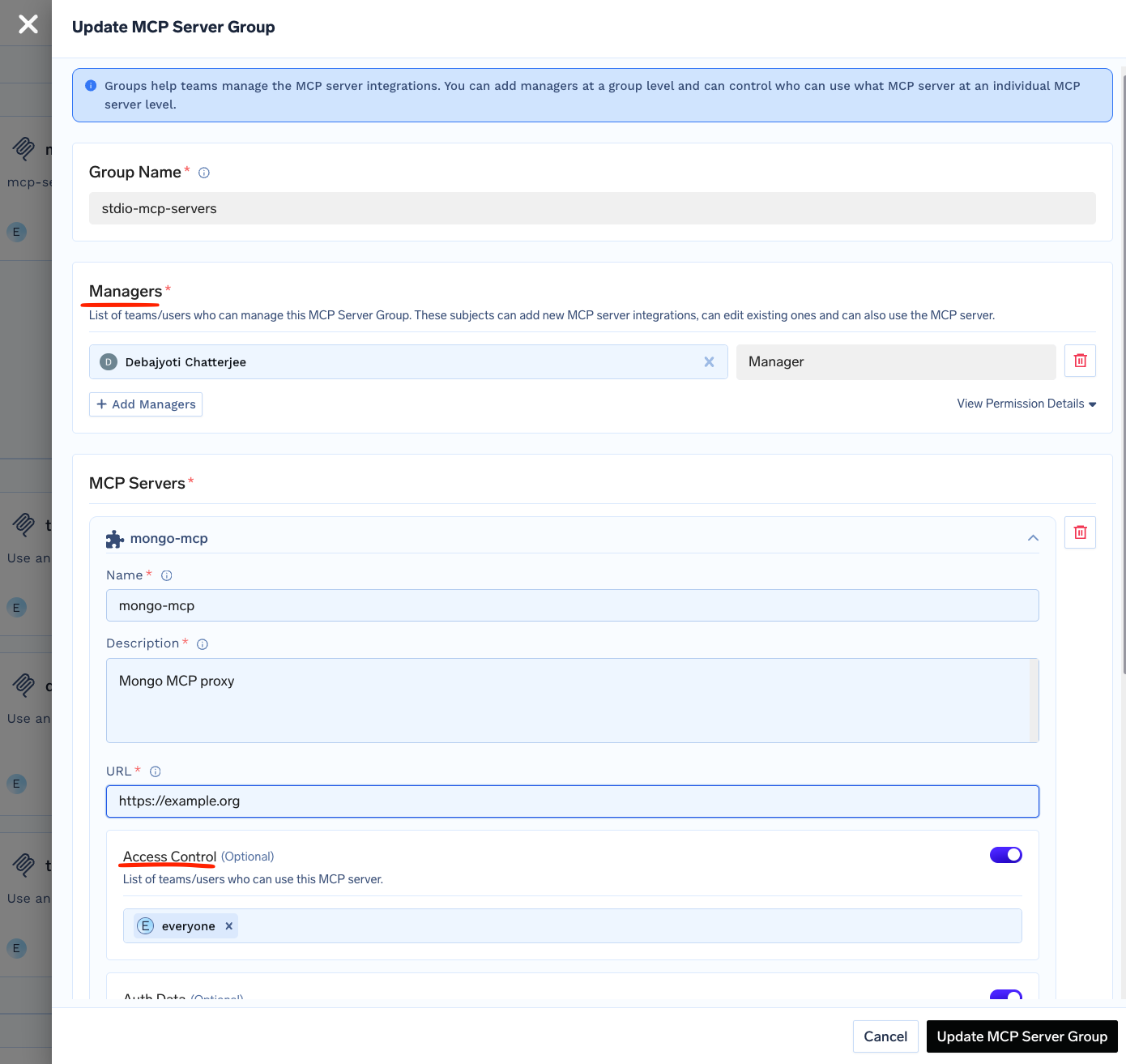
- User identity (TrueFoundry user, Virtual Account, or External Identity)
- Role-based permissions assigned to users or groups
- MCP server group membership
Layer 3: MCP Server Authentication Models
This layer handles how the Gateway authenticates to downstream MCP servers. TrueFoundry supports four authentication models, each suited for different use cases.No Auth
No Auth
- Demo or sandbox APIs
- Public tools like a Calculator MCP Server or DeepWiki MCP server
Static Header Auth (Shared Credentials)
Static Header Auth (Shared Credentials)
OAuth2 (Per-User Credentials)
OAuth2 (Per-User Credentials)
- Personal productivity tools (email, calendar, documents)
- Systems where permissions differ per user
- Actions that must be attributed to an individual
- Compliance requirements that need end-to-end user traceability
- End user authenticates with the Gateway (using TrueFoundry token or External Identity)
- End user attempts to call an MCP tool → Gateway returns auth error with authorization URL
- End user visits URL and completes OAuth consent on the third-party service (e.g., GitHub)
- TrueFoundry stores the OAuth token for that end user
- Future requests automatically include the end user’s OAuth token
Token Passthrough
Token Passthrough
- You have your own IdP (e.g., Auth0, Okta, Cognito) that authenticates your end users
- The MCP server is configured to validate JWTs from your IdP
- You want to control authentication entirely through your own system
- Your end user authenticates with your IdP and receives a JWT
- End user calls your agent with their JWT
- TrueFoundry passes the JWT directly to the MCP server
- The MCP server validates the JWT against your IdP’s configuration
Mixing Authentication Strategies
Organizations commonly mix multiple approaches within the same deployment:| MCP Server | Auth Strategy | Reason |
|---|---|---|
| Gmail, Slack | Per-user OAuth | Personal data, user-specific permissions |
| Internal Database MCP | Shared service account | Read-only analytics access |
| GitHub | Per-user OAuth | User-specific repo access and commit attribution |
| Custom Internal API | Token Passthrough | Uses organization’s IdP for validation |
Configuring MCP Server Authentication
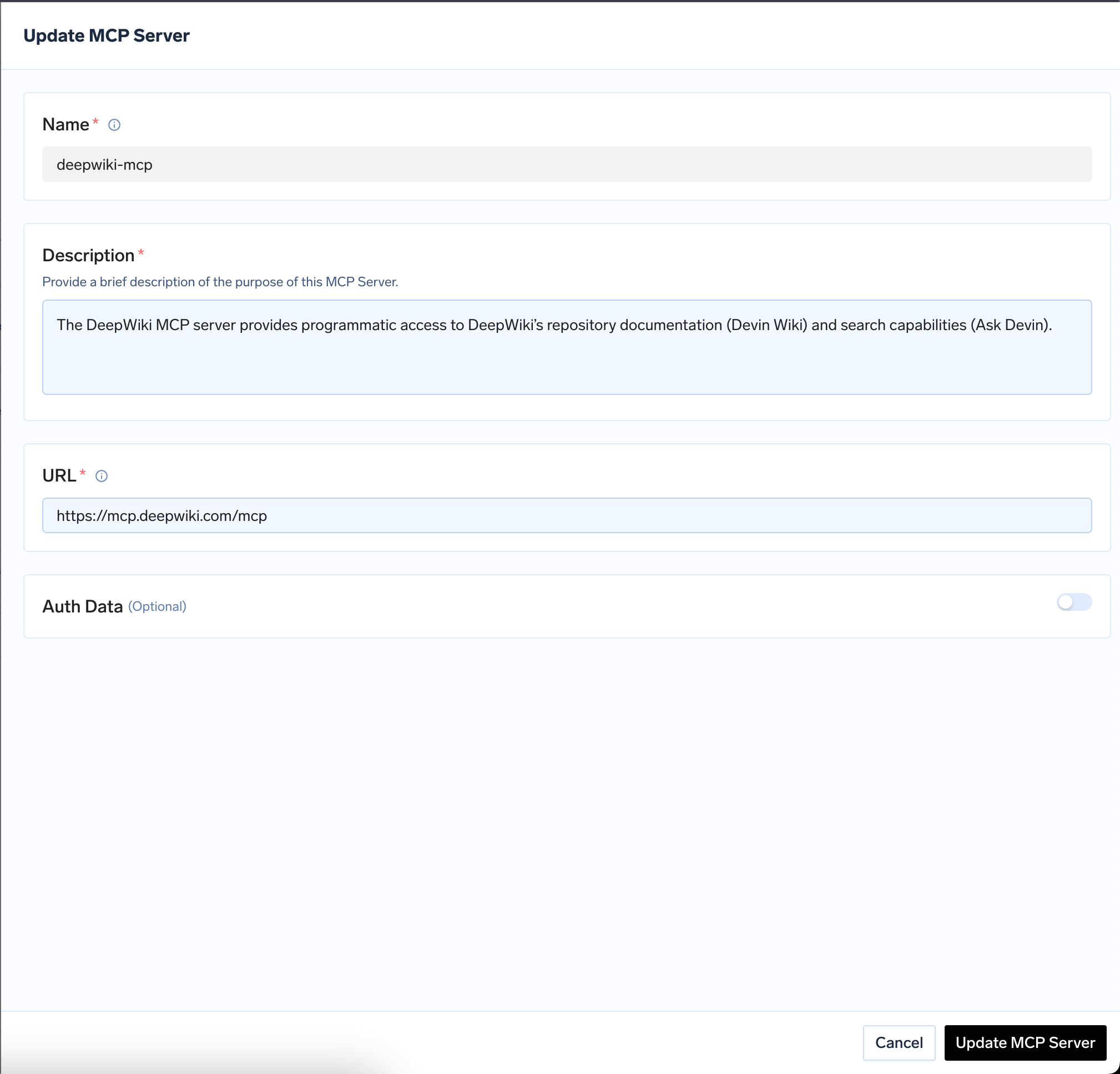
When registering an MCP server, choose the authentication type that determines how requests are authenticated with the upstream MCP server.No Auth
No Auth
- Demo or sandbox APIs
- Public tools like a Calculator MCP Server or DeepWiki MCP server
Static Header Auth (Shared Credentials)
Static Header Auth (Shared Credentials)
Authorization header value. Users authenticate to the Gateway with their TrueFoundry or IdP token, and the Gateway forwards requests with the shared Hugging Face token after RBAC checks pass.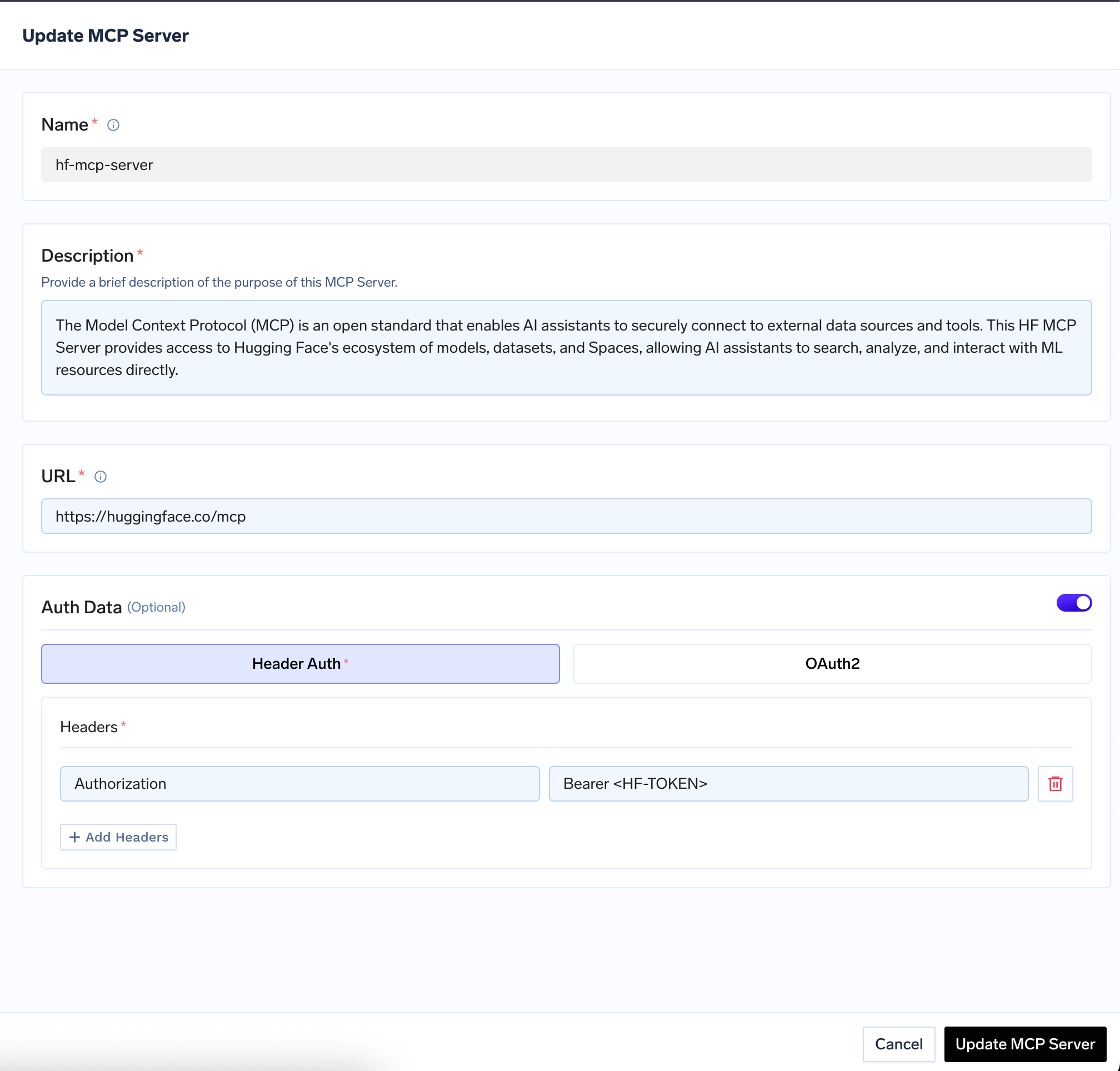
OAuth2 (Per-User Credentials)
OAuth2 (Per-User Credentials)
Create an OAuth2 app in your provider's developer portal
<tfy-control-plane-base-url> with your TrueFoundry control plane URL. Note your OAuth2 App ID, Secret, and required scopes.Register the MCP Server in the AI Gateway
-
Navigate to MCP Servers tab and click Add New MCP Server Group
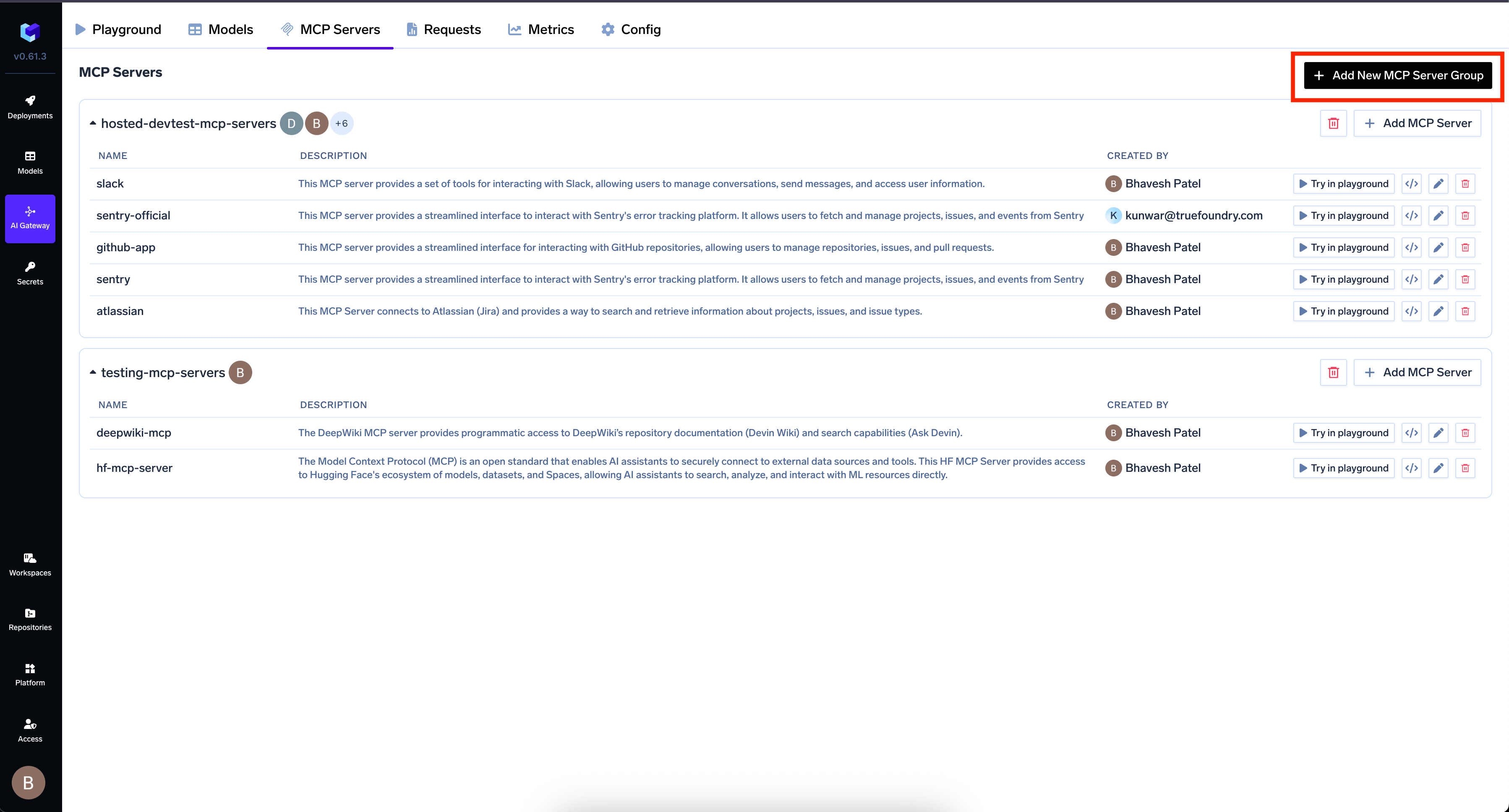
-
Click Add MCP Server and provide:
- Endpoint URL: The URL of your MCP Server
- Authentication Type: Select OAuth2
- OAuth2 App ID: The client ID from your OAuth2 app
- OAuth2 App Secret: The client secret
- OAuth2 App Scopes: Required scopes for accessing resources
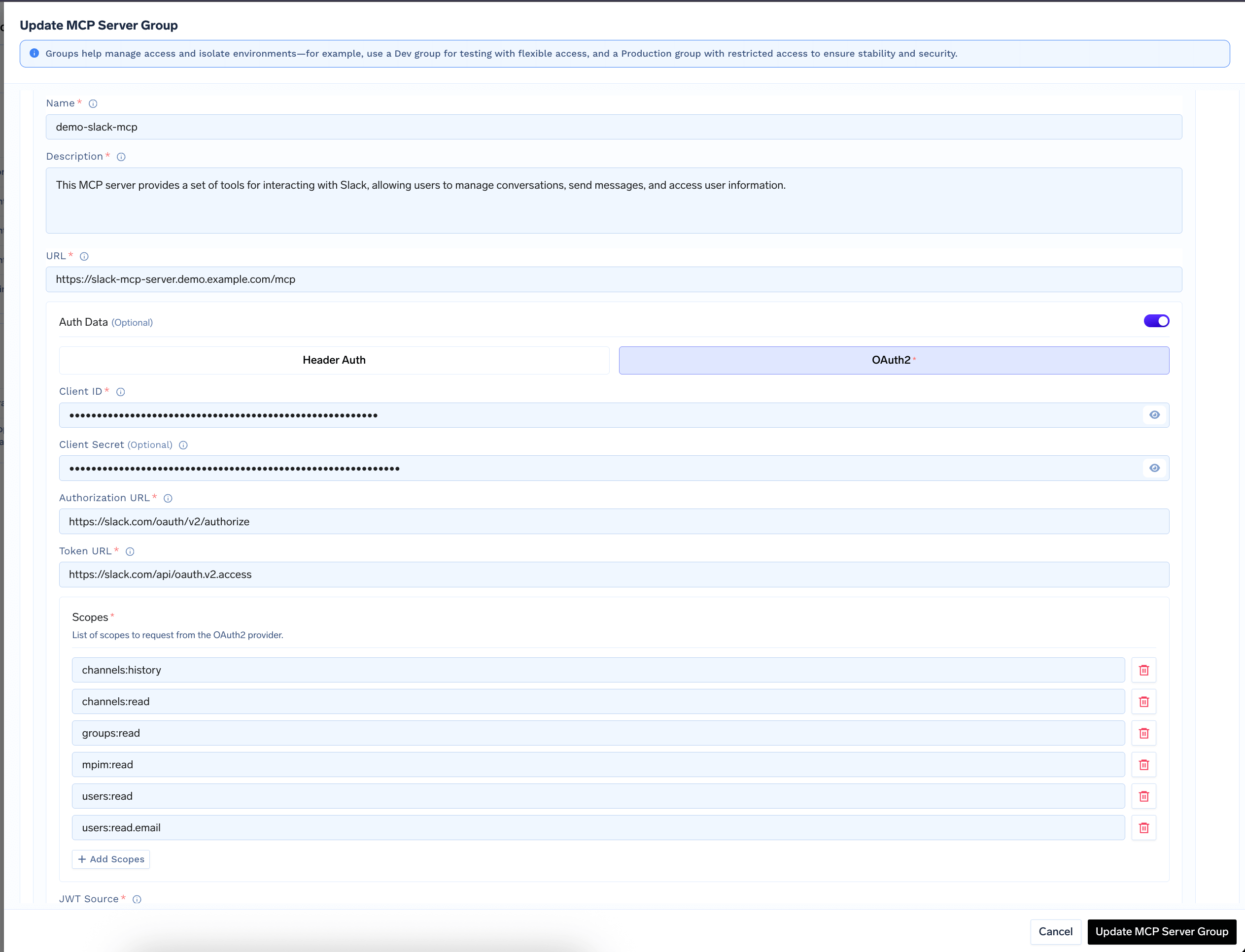
Connect and authorize
- Click Add Tool/MCP Servers in the AI Gateway UI
- For OAuth2 MCP Servers, click Connect Now to authorize
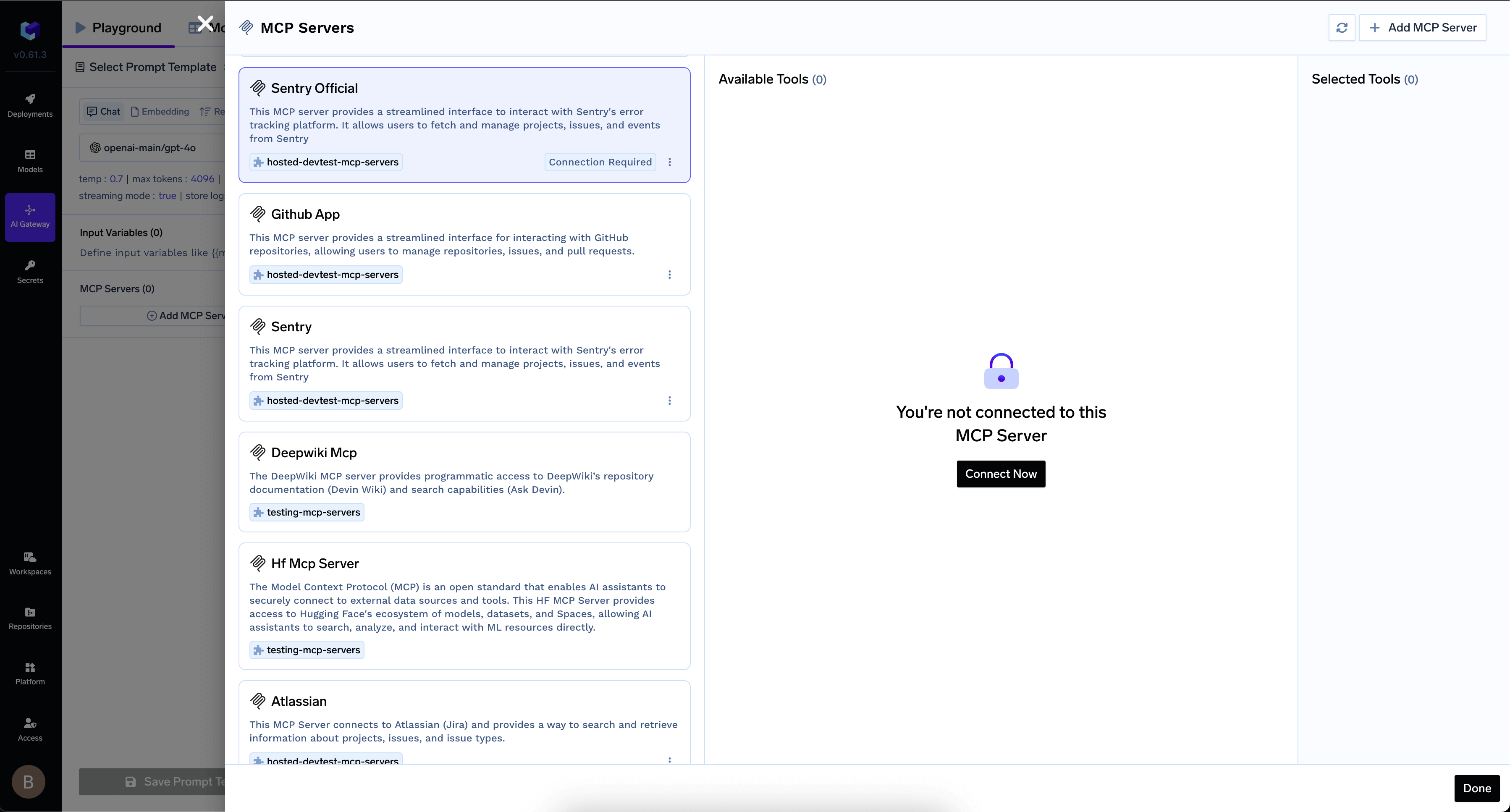
Authorize your MCP Server in AI Gateway
- Once authorized, the MCP Server’s tools appear in the list
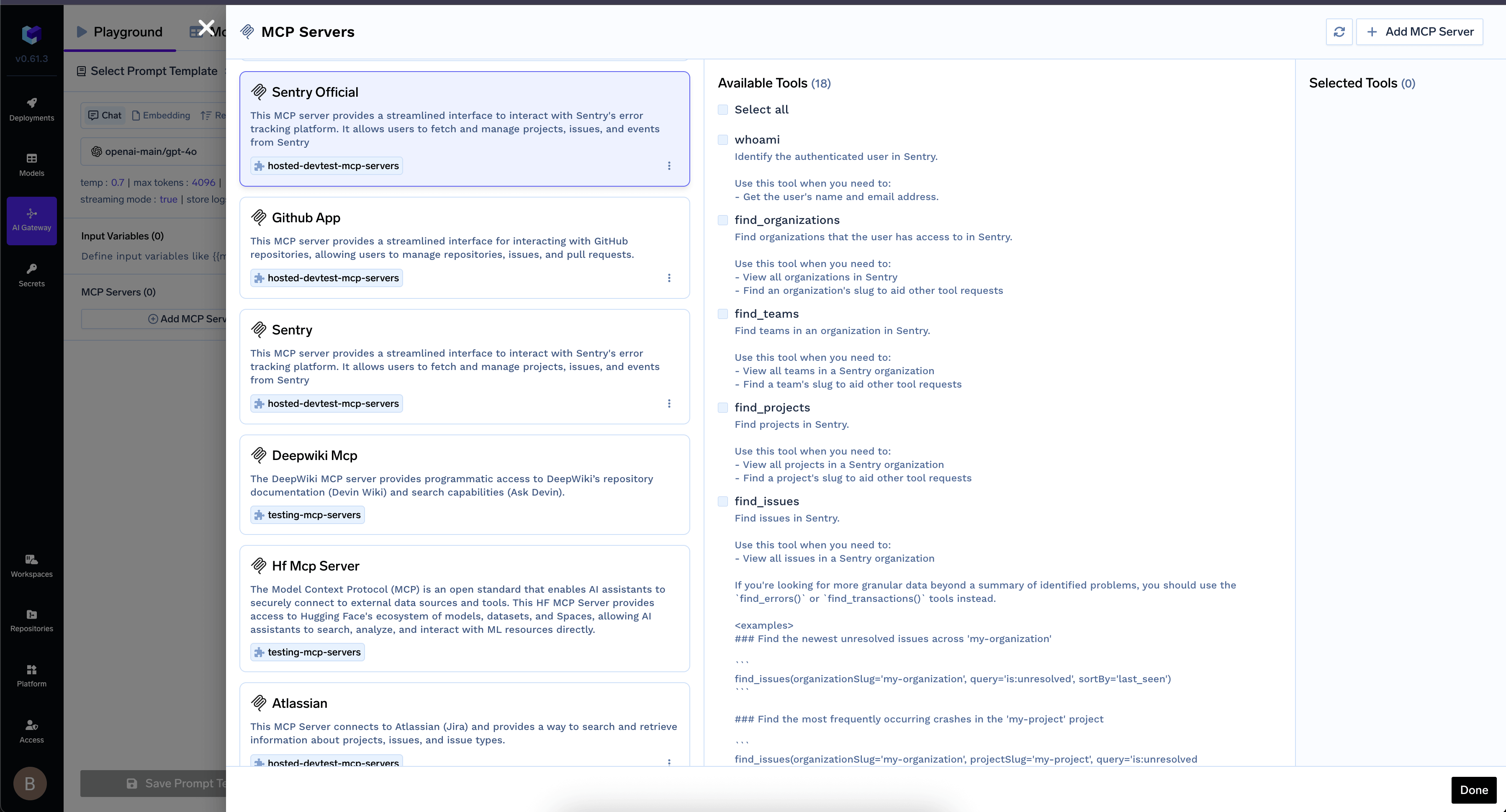
MCP Server tools available after authentication
- You can revoke authorization at any time:
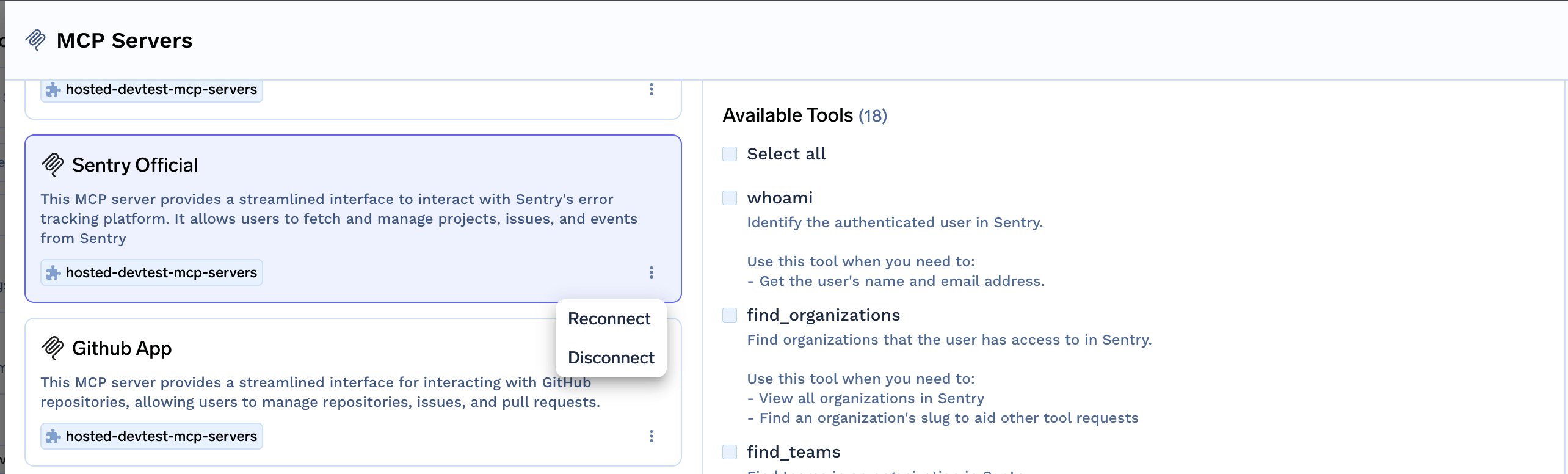
Revoke your OAuth2 authorization
Token Passthrough
Token Passthrough
- Register the MCP server with Token Passthrough authentication type
- Configure an External Identity to allow your IdP tokens
- The user’s JWT is automatically forwarded to the MCP server
Layer 4: Passing Custom Headers
You can pass custom headers to MCP servers using thex-tfy-mcp-headers header. This is useful for authentication tokens, metadata, or any headers your MCP server requires.
x-tfy-mcp-headers header format differs between MCP Gateway and Agent API:- MCP Gateway (this section): Uses different formats for remote vs virtual servers
- Agent API: Always uses full FQN-based format (see Agent API docs)
sample-mcp-group/server-1). Copy the identifier from the UI since virtual MCP servers contain multiple remote MCP servers.Authentication Scenarios
The following scenarios show how different authentication flows work in practice. Each scenario includes a sequence diagram and a detailed step-by-step breakdown.Scenario 1: TrueFoundry Users with OAuth-Based MCP Servers
Use case: Internal developers with TrueFoundry accounts accessing OAuth-protected services like Slack, GitHub, or Atlassian. This is the most common enterprise scenario where your developers authenticate to TrueFoundry and the Gateway handles OAuth token management for downstream MCP servers.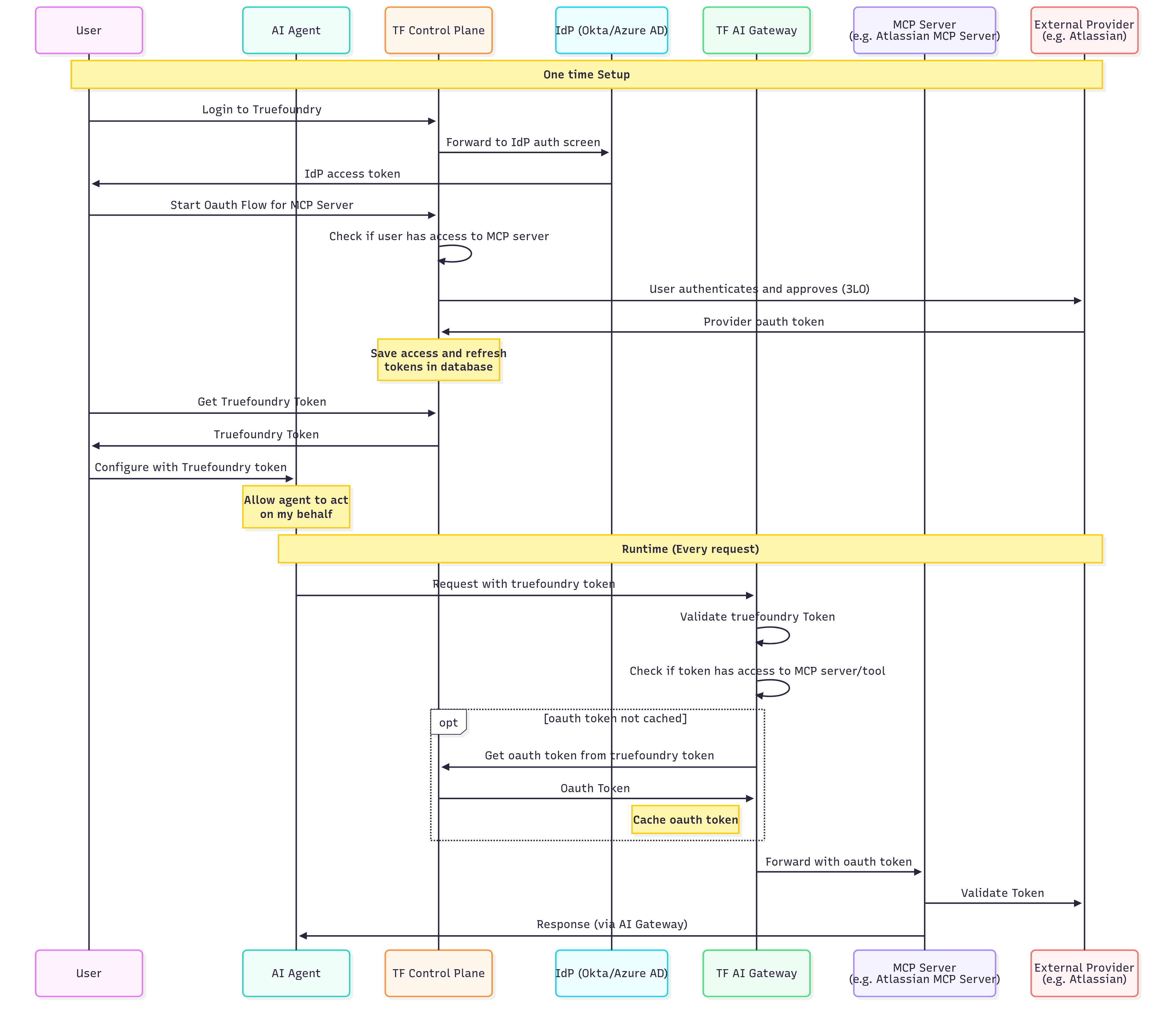
One-Time Setup (Steps 1-8)
One-Time Setup (Steps 1-8)
| Step | Action | Description |
|---|---|---|
| 1 | User → Control Plane | User logs into TrueFoundry |
| 2 | Control Plane → IdP | TrueFoundry redirects to your identity provider (Okta, Azure AD, etc.) |
| 3 | IdP → User | User authenticates and receives IdP access token |
| 4 | User → Control Plane | User initiates OAuth flow for the MCP server (e.g., “Connect to Atlassian”) |
| 5 | Control Plane | Verifies user has permission to access this MCP server |
| 6 | Control Plane → External Provider | User is redirected to the external service (e.g., Atlassian) to authorize access |
| 7 | External Provider → Control Plane | External service returns OAuth tokens after user approval |
| 8 | Control Plane | Securely stores access and refresh tokens, linked to the user’s identity |
Runtime Flow (Every Request)
Runtime Flow (Every Request)
| Step | Action | Description |
|---|---|---|
| 1 | Agent → Gateway | AI Agent sends request with TrueFoundry token |
| 2 | Gateway | Validates the TrueFoundry token |
| 3 | Gateway | Checks if the token has access to the requested MCP server/tool |
| 4 | Gateway → Control Plane | (If not cached) Retrieves user’s OAuth token for this MCP server |
| 5 | Gateway | Caches the OAuth token for subsequent requests |
| 6 | Gateway → MCP Server | Forwards request with the user’s OAuth token |
| 7 | MCP Server → External Provider | Validates token and fetches user-specific data |
| 8 | MCP Server → Agent | Returns response through the Gateway |
- Users authenticate once to TrueFoundry and access multiple OAuth-protected services
- Tokens are automatically refreshed when they expire
- Each user’s actions are attributed to their individual identity
- Users can revoke access to specific services at any time
Scenario 2: End Customers with OAuth-Based MCP Servers (CIAM)
Use case: Your end customers (who don’t have TrueFoundry accounts) accessing OAuth-protected services through your application. This scenario is common for Customer Identity and Access Management (CIAM) where you want your customers to connect their own accounts (e.g., their Gmail, Slack, or CRM) to your AI-powered application.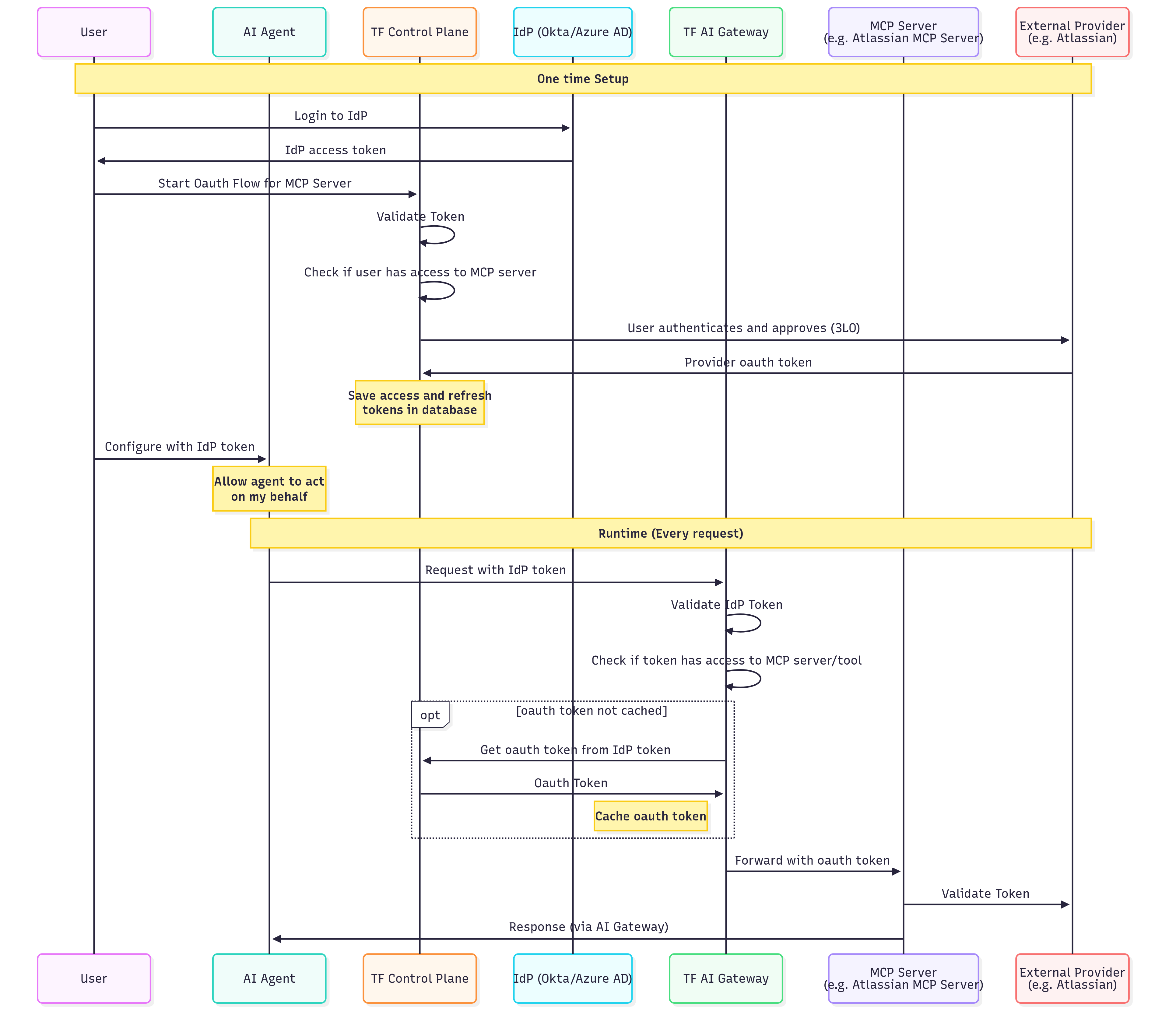
One-Time Setup (Steps 1-7)
One-Time Setup (Steps 1-7)
| Step | Action | Description |
|---|---|---|
| 1 | User → IdP | User logs into your identity provider directly (not TrueFoundry) |
| 2 | IdP → User | User receives IdP access token |
| 3 | User → Control Plane | User initiates OAuth flow for the MCP server |
| 4 | Control Plane | Validates the IdP token and extracts user identity |
| 5 | Control Plane | Checks if the user/role has access to this MCP server |
| 6 | Control Plane → External Provider | Redirects user to authorize access (3-legged OAuth) |
| 7 | External Provider → Control Plane | Returns OAuth tokens; Control Plane stores them securely |
Runtime Flow (Every Request)
Runtime Flow (Every Request)
| Step | Action | Description |
|---|---|---|
| 1 | Agent → Gateway | AI Agent sends request with IdP token (not TrueFoundry token) |
| 2 | Gateway | Validates the IdP token using your SSO configuration |
| 3 | Gateway | Checks if the extracted user identity has access to the MCP server/tool |
| 4 | Gateway → Control Plane | (If not cached) Retrieves the user’s OAuth token using their IdP identity |
| 5 | Gateway | Caches the OAuth token for performance |
| 6 | Gateway → MCP Server | Forwards request with user’s OAuth token |
| 7 | MCP Server → External Provider | Validates and processes the request |
| 8 | MCP Server → Agent | Returns response through the Gateway |
- Users authenticate with your IdP, not TrueFoundry
- The Gateway validates your IdP tokens directly
- Useful for B2B SaaS applications with end-customer integrations
Scenario 3: Shared Service Account Authentication (Header-Based)
Use case: Accessing MCP servers with shared credentials where individual user identity at the downstream service is not required. This scenario is ideal for read-only access to shared resources, internal tools, or services that don’t support per-user OAuth.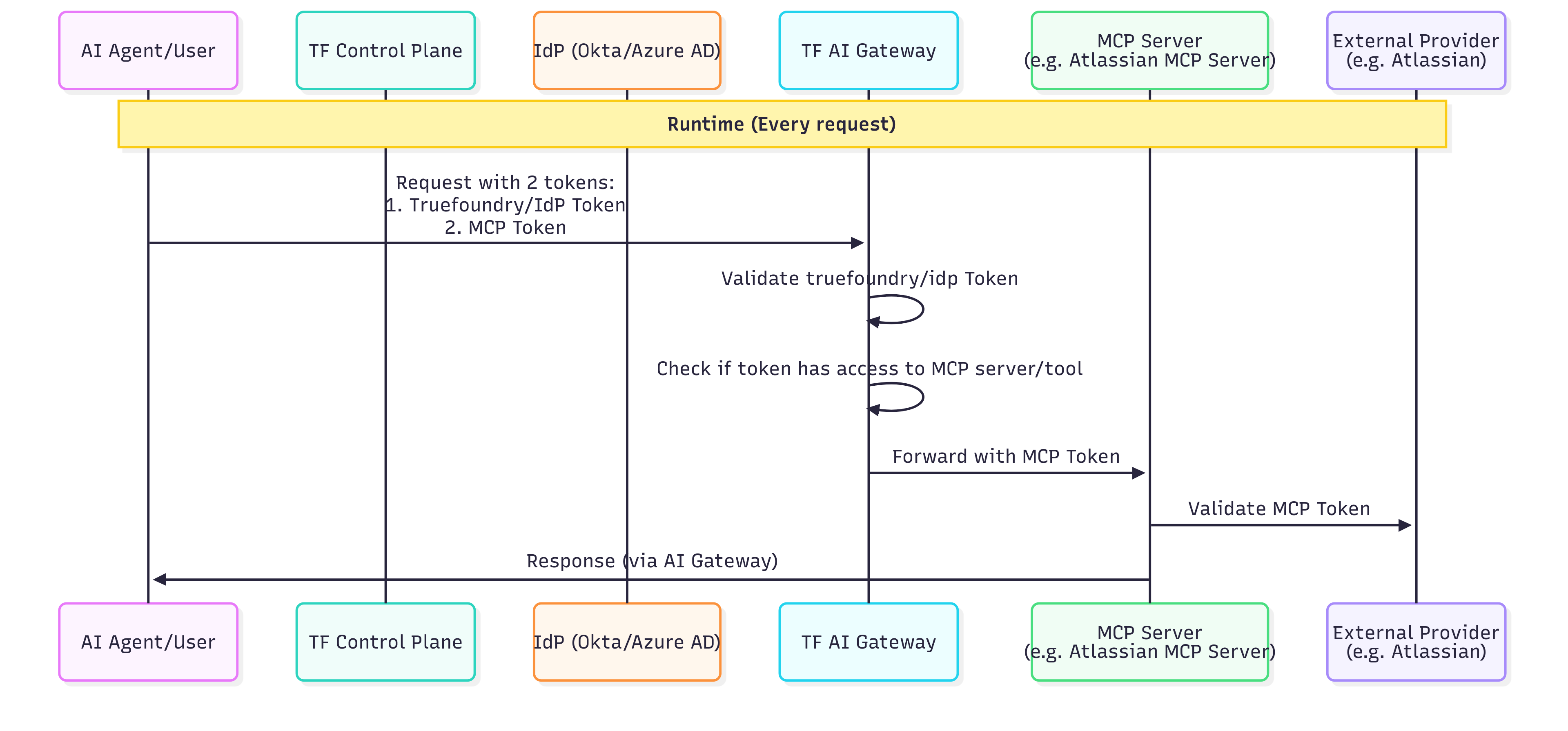
Administrator Setup (One-Time)
Administrator Setup (One-Time)
| Step | Action | Description |
|---|---|---|
| 1 | Admin → Control Plane | Administrator registers the MCP server with static header authentication |
| 2 | Admin | Configures the shared API key or bearer token in the MCP server settings |
| 3 | Admin | Defines which users/roles have access to this MCP server through RBAC policies |
Runtime Flow (Every Request)
Runtime Flow (Every Request)
| Step | Action | Description |
|---|---|---|
| 1 | Agent → Gateway | AI Agent sends request with user’s TrueFoundry or IdP token |
| 2 | Gateway | Validates the user token |
| 3 | Gateway | Checks if the user has access to this MCP server (RBAC) |
| 4 | Gateway | Injects the shared credentials (static headers) into the request |
| 5 | Gateway → MCP Server | Forwards request with shared service account credentials |
| 6 | MCP Server | Processes request using the shared credentials |
| 7 | MCP Server → Agent | Returns response through the Gateway |
- Read-only access to knowledge bases or documentation
- Internal analytics dashboards accessible by multiple teams
- Legacy systems without OAuth support
- Tools where actions don’t need individual user attribution
- All users share the same level of access to the downstream service
- Actions cannot be attributed to individual users at the downstream service level
- TrueFoundry’s audit logs still track which user made each request at the Gateway level
Scenario 4: Token Passthrough Authentication
Use case: Accessing MCP servers that validate tokens from your IdP directly, without TrueFoundry managing the authentication. This scenario is for organizations that want the MCP server itself to validate the user’s JWT rather than using OAuth2 token exchange.Setup Requirements
Setup Requirements
| Step | Action | Description |
|---|---|---|
| 1 | Configure External Identity | Set up SSO integration and External Identity as described in Layer 1 |
| 2 | Register MCP Server | Register the MCP server with Token Passthrough authentication |
| 3 | Configure MCP Server | Ensure the MCP server is configured to validate JWTs from your IdP |
Runtime Flow (Every Request)
Runtime Flow (Every Request)
| Step | Action | Description |
|---|---|---|
| 1 | User → Your IdP | User authenticates with your IdP and receives a JWT |
| 2 | Agent → Gateway | AI Agent sends request with user’s JWT |
| 3 | Gateway | Validates the JWT using External Identity configuration |
| 4 | Gateway | Checks if the user has access to this MCP server (RBAC) |
| 5 | Gateway → MCP Server | Forwards request with user’s JWT unchanged |
| 6 | MCP Server | Validates the JWT against your IdP’s configuration |
| 7 | MCP Server → Agent | Returns response through the Gateway |
- Your MCP server already trusts your IdP
- You want full control over authentication at the MCP server level
- You don’t want TrueFoundry to manage OAuth tokens
Implementation Guide
This section provides practical code examples for implementing authentication in your AI agents.Handling OAuth Flows in Code
When connecting to an OAuth2-protected MCP server, if the user hasn’t completed OAuth consent, the MCP Gateway returns an error containing the authorization URL. Your agent needs to extract this URL and redirect the user.Using Virtual Accounts for Server-to-Server Access
When your application needs to access MCP servers without individual user context:Token Passthrough Implementation
For MCP servers that validate tokens from your IdP:Choosing the Right Authentication Model
| Factor | Per-User OAuth | Shared Service Account | Token Passthrough |
|---|---|---|---|
| User attribution | Full traceability to individual users | Actions attributed to shared account only | Depends on MCP server implementation |
| Access control | Per-user permissions at downstream service | Same access for all authorized users | Controlled by MCP server |
| Token management | Gateway manages tokens per user | Single token managed by administrators | User/application manages tokens |
| User experience | One-time OAuth consent flow | No additional authorization required | No additional authorization required |
| Best for | Personal data, compliance-sensitive operations | Shared resources, read-only access | Custom MCP servers with your IdP |
| Examples | Gmail, Slack, GitHub, Atlassian | Hugging Face, internal databases, knowledge bases | Internal APIs, custom services |
Decision Flowchart
FAQ
OAuth2 vs Token Passthrough: Which should I choose?
OAuth2 vs Token Passthrough: Which should I choose?
| Question | If Yes → |
|---|---|
| Does the MCP server connect to third-party services (GitHub, Slack, Google, etc.)? | OAuth2 |
| Does the MCP server validate tokens from your IdP? | Token Passthrough |