

- Before Sending the Request to the LLM: These guardrails are called Input Guardrails and are applied to the request before it is sent to the LLM. Common usecases include:
- Masking or redacting PII from the request,
- Filtering or blocking requests containing prohibited topics or sensitive content
- Validating input format and structure to prevent prompt injection or malformed data.
- After Receiving the Response from the LLM: These guardrails are called Output Guardrails and are applied to the response after it is received from the LLM. Common usecases include:
- Filtering or blocking responses containing prohibited topics or sensitive content
- Validating output format and structure to prevent hallucination or non-compliant data.
- Block / Validate request or response: In this mode, the guardrail checks either the request sent to the AI Gateway or the response received from the LLM against defined rules and if the rule is violated, the data is blocked and an error is returned to the client. This mode is called
validateand is used to strictly enforce compliance and prevent unsafe or non-compliant data from being processed or returned at any stage. - Modify / Mutate request or response: In this mode, the guardrail modifies the request before it is sent to the model, or alters the response after it is received from the LLM. For example, mutation can redact sensitive information, reformat data, or adjust content to meet policy requirements. This mode is called
mutatein the Truefoundry platform.
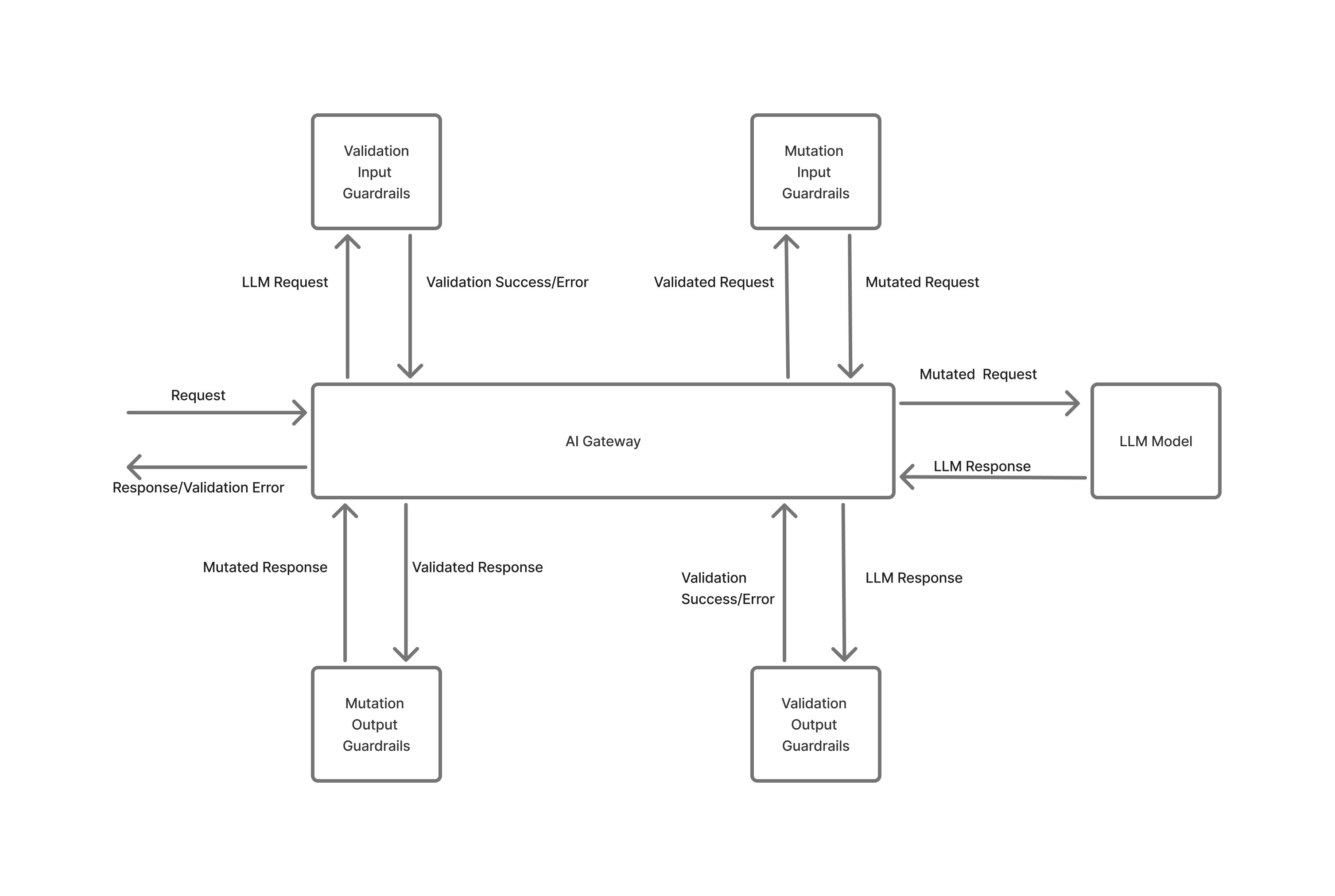
Flow chart of how guardrails work in the AI Gateway
Guardrail Execution Flow
When a request arrives at the gateway, guardrails execute in the following sequence:- Input Validation Guardrail starts (asynchronous): Begins immediately but doesn’t block processing.
- Input Mutation Guardrail executes (synchronous): Must complete before the model request starts.
- Model request starts: Proceeds with mutated messages while input validation continues in parallel.
- Input Validation completion: If validation fails, the model request is cancelled immediately to prevent costs.
- Output Mutation Guardrail: Processes the model response after input validation passes.
- Output Validation Guardrail: Validates the response. If it fails, the response is rejected (model costs already incurred).
- Response returned: Validated and mutated response is returned to the client.
Optimization Strategy
The gateway optimizes time-to-first-token latency by executing guardrail checks in parallel where possible. Input validation runs concurrently with the model request, and if validation fails, the model request is immediately cancelled to avoid incurring unnecessary costs.Execution Flow Gantt Charts
All Guardrails Pass Successfully
The sequence diagram below illustrates the happy case execution flow where all guardrails pass successfully. In this scenario, input validation runs asynchronously in parallel with input mutation and the model request. Input mutation completes first, allowing the model request to proceed with mutated messages. While the model processes the request, input validation completes in the background. Once the model response is received and input validation has passed, the response flows through output mutation and output validation guardrails before being returned to the client.
Input Validation Guardrail Failure
The sequence diagram below illustrates the execution flow when input validation guardrail fails. In this scenario, input validation runs asynchronously in parallel with the model request. When input validation completes and fails, the gateway immediately cancels the model request to prevent unnecessary costs. The request is terminated at this point, and an error response is returned to the client without proceeding to output guardrails.
Output Validation Guardrail Failure
The sequence diagram below illustrates the execution flow when output validation guardrail fails. In this scenario, all input guardrails pass successfully, and the model request completes and returns a response. The response flows through output mutation guardrail successfully, but when output validation guardrail checks the response, it fails. At this point, the model request has already completed (costs have been incurred), but the response is rejected and an error is returned to the client instead of the model’s output.
Key Characteristics
- Input Validation Guardrail: Executes asynchronously in parallel with Input Mutation
- Input Mutation Guardrail: Executes synchronously and must complete before Model Request starts
- Model Request: Executes asynchronously in parallel with Input Validation, but only starts after Input Mutation completes. If Input Validation fails, the Model Request is cancelled.
- Output Mutation Guardrail: Executes synchronously after Model Request completes
- Output Validation Guardrail: Executes synchronously after Output Mutation completes. If Output Validation fails, the response is rejected (Model Request has already completed).
Controlling Guardrails Scope
By default, guardrails evaluate all messages in a conversation. You can control this behavior using theX-TFY-GUARDRAILS-SCOPE header:
all(default): Evaluates all messages in the conversation historylast: Evaluates only the most recent message
Error Handling
If a guardrail service experiences an error (API timeout, 5xx errors, network issues), the gateway continues processing your request by default. This ensures your application remains available even if a guardrail provider has issues.Guardrail API errors do not block requests. Your LLM calls will complete successfully even if guardrail checks fail to execute.
Guardrail Integrations
Truefoundry Gateway doesn’t provide any guardrails of its own. It instead integrates with the popular guardrail providers mentioned below to provide a unified interface for guardrail management and configuration.
OpenAI Moderations
Integrate with OpenAI’s moderation API to detect and handle content that may violate usage policies, like violence, hate speech, or harassment.
AWS Bedrock Guardrail
Integrate with AWS Bedrock’s capabilities to apply guardrails on AI models.
Azure PII
Integrate with Azure’s PII detection service to identify and redact PII data in both requests and responses.
Azure Content Safety
Leverage Azure Content Safety to detect and mitigate harmful, unsafe, or inappropriate content in model inputs and outputs.
Enkrypt AI
Integrate with Enkrypt AI for advanced moderation and compliance, detecting risks like toxicity, bias, and sensitive data exposure.
Palo Alto Prisma AIRS
Integrate with Palo Alto AI Risk to detect and mitigate harmful, unsafe, or inappropriate content in model inputs and outputs.
PromptFoo
Integrate with Promptfoo to apply guardrails like content moderation on the models.
Fiddler
Integrate with Fiddler to apply guardrails, such as Fiddler-Safety and Fiddler-Response-Faithfulness on the models.
Pangea
Integrate with Pangea for API-based security services providing real-time content moderation, prompt injection detection, and toxicity analysis.
Patronus AI
Integrate with Patronus AI to detect hallucinations, prompt injection, PII leakage, toxicity, and bias with production-ready evaluators.
Bring Your Own Guardrail
Integrate your own custom guardrail using frameworks like Guardrails.AI or a python function.
Configure Guardrails
Guardrails cane be configured both at a per request level and at the central gateway layer. To configure at the per request level, you can use theX-TFY-GUARDRAILS header. You can copy the code from the Playground Section.
To configure at the gateway layer, you will need to create a YAML file that which guardrails need to be applied to which subset of the requests. You can decide the subset of requests based on the user making the request, model or any other metadata in the request. You can read about it more in the Configure Guardrails section.